Does a digital right to work check protect my agency?
Yes, when it is done as the Home Office prescribes: it gives your agency a statutory excuse against the civil penalty of up to £60,000 per illegal worker. The provider must be on the government’s register. Before the temp starts, the photo is matched to the person, by your team or by the provider’s facial recognition, and your team keeps the provider’s output.
Half an hour on your onboarding, from first upload to sign-off.
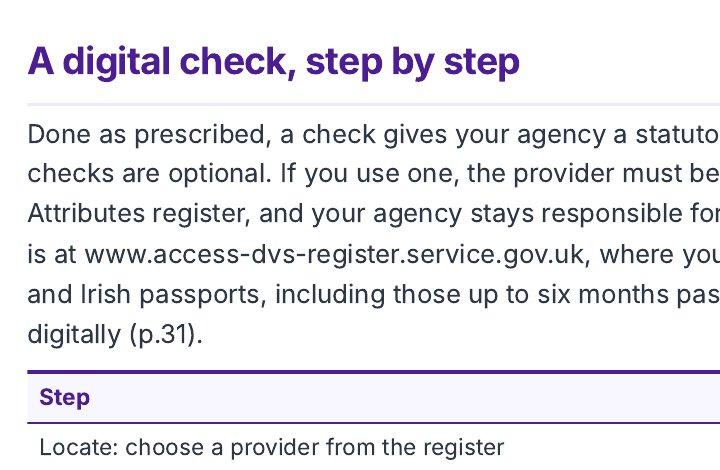
The Home Office’s four steps, and who does each
Your team
Locate
Choose a provider from the Office for Digital Identities and Attributes register that can carry out right to work checks. On the register, filter by Right to Work.
The registered provider
Obtain
It runs the digital check, and you receive its output, the document setting out the result.
Your team or the provider
Check
Satisfy yourself the photo and details belong to the person: in person, by video call, or with the provider’s facial recognition.
Your team
Retain
Keep a clear copy of the output, and of any facial comparison, for as long as the person works for you and two years after (p.32).
- 6 months
- How far past its expiry date a British or Irish passport can still be checked digitally (p.31)
- 2 years
- How long to keep the output after the person leaves (p.32)
- Optional
- Digital checks are a choice; if used, the provider must be registered (p.30)
The Home Office’s four steps, and who does each
From the Employer’s guide to right to work checks, in force from 1 October 2026. Digital checks are optional; if you use one, the provider must be a registered digital verification service provider (DVSP) (p.30). Your agency, not the provider, stays responsible for the check being done as prescribed (p.30).
Your team
Locate
Choose a provider from the Office for Digital Identities and Attributes register that can carry out right to work checks. On the register, filter by Right to Work.
The registered provider
Obtain
It runs the digital check, and you receive its output, the document setting out the result.
Your team or the provider
Check
Satisfy yourself the photo and details belong to the person: in person, by video call, or with the provider’s facial recognition.
Your team
Retain
Keep a clear copy of the output, and of any facial comparison, for as long as the person works for you and two years after (p.32).
Which temps a digital check covers
A provider can check
- Valid British or Irish passports and Irish passport cards, including those up to six months past their expiry date (p.31).
- Documents on the Home Office’s List A, or its List B, where the issuing authority holds them in digital form (p.31).
Use another way
- A share code: a Home Office online check.
- Other documents from the Home Office’s lists: a manual check of the originals. See the three ways to check.
Done as prescribed by both your agency and the provider, the statutory excuse is continuous (p.31).
When someone else runs the check
Through your onboarding firm.
You can buy the check through a screening or onboarding firm. It must name the registered provider that carried out the check, and must not misstate that provider’s status (p.31, p.78).
No second face match.
Where the provider ran the facial recognition, the Home Office says employers are not required to duplicate it (p.78).
Questions agencies ask
Do we have to use digital right to work checks?
No. They are optional. If you use one, the provider must be on the register.
Can we buy the check through our onboarding software?
Yes. The firm selling it must say which registered provider carried out the check.
Can our client rely on our right to work check for a permanent hire?
Not on a check you carried out yourself. The client is the employer and stays responsible for the check, and it cannot rely on a check carried out independently by an outside party such as your agency, unless it was a prescribed check through a registered digital provider (p.78).
How do we check a temp a digital provider can’t?
The Home Office’s other ways stay open: a manual check of original documents from its lists, or a Home Office online check with a share code. A temp without a valid passport must not be treated less favourably.
Checked by Talisman’s product team on 23 November 2026.
AI agents for every recruitment agency, on your system or ours, with 40 years of temp and contract know-how behind each one.
Most recruitment software uses intermediate AI that makes each user faster. Talisman is full AI for your agency: our agents do the work your users would do, so the process runs without them.
For temp and contract, nobody does it the way we do: agents with 40 years of temp and contract know-how and our own platform for bookings, timesheets, and pay and bill.
Perm and executive search desks can hand over work on Bullhorn, any other CRM or Talisman.
Tell us what you do. We build the agent.
Where Compliance Clara fits
The registered provider runs the digital check. Clara works the rest of the file, and your compliance lead decides.
Compliance Clara
Asks for the rest of the checklist
The documents your checklist names, and again when an upload fails.
Compliance Clara
Checks proofs of address
Each one as it arrives.
Compliance Clara
Offers three slots
If your team matches faces by video call, she offers three slots and sends the invite.
Your compliance lead
Makes the right to work decision
With the provider’s output on file, decides and signs the file off before the temp starts.
Maria Silva, Temp care assistant · Queue: To review
| First proof of address | Checked on upload |
|---|---|
| Second proof of address | Too dark to read. A new one asked for |
| Enhanced DBS certificate | Received |
The registered provider runs the digital check. Your compliance lead makes the right to work decision and signs the file off.
One agency went from 20 staff to 4.
Book a demoSee Clara ask for the rest of the file while the registered provider runs the check.
Right to work for agency temps: the checks and the file
Written for right to work, digital checks included: the four steps with who does each, what each temp’s file needs before the first shift, and what Clara gets ready for your compliance lead.
- The Home Office’s four steps for a digital check, and who does each
- What each temp’s file needs before the first shift, and the three ways to check
- What Clara gets ready and what your compliance lead decides, with a handover sheet
Where this comes from
Every fact above is taken from the sources linked here: the Home Office guide, read on 22 November 2026, and the register, read on 23 November 2026.
- Home Office: Employer’s guide to right to work checks · gov.uk, PDF. In force from 1 October 2026.
- GOV.UK: digital verification services register · Services can be filtered by the Right to Work supplementary code.
What it costs
£129 per user, per month. Agents included. Implementation fees are separate.
See the pricing pageTell us what you do. We build the agent.
Half an hour on your onboarding, from first upload to sign-off.