AI agents for every recruitment agency, on your system or ours, with 40 years of temp and contract know-how behind each one.
Tell us what you do.
We build the agent.
The timesheet photo lands. A document still needs chasing. An agent does that routine work on your system or ours. Your consultants keep the calls and the relationships.
- 1Read
- 2Match
- 3Record
- 4Hand over

Timesheet photo received
Timecard created. Review Wednesday.
Sample worker · Manchester
W/E 20 Nov
Read from the photo
Booking 1042 · Manchester · W/E 20 Nov
Match worker, site and week.
Worker, site and week match.
Mon–Fri · 7.5 h per day
8 h submitted. 7.5 h booked. Your team checks the difference.
Attached when the timecard is saved.
Your approvals still apply.
In this example, Tommy reads the photo, matches booking 1042 and records 38 hours. Wednesday is half an hour over the booking and goes to your team for review. The original photo stays attached.
The agent does the routine work. Your consultants stay on the phone.
Intermediate AI helps a person do a task faster. Full AI is our principle: the agent does the routine work that person would do, so the process runs without them.
Intermediate AI: help with the task
The person still drives each step.
- Read the timesheetYou
- Ask AI for the hoursYou, with AI
- Find the bookingYou
- Enter the timecardYou
Full AI: hand over the task
Agree the work. Train the agent. Let it run.
- 1Read
- 2Match
- 3Record
- 4Hand over
Tommy does the routine work
Your team checks what he flags
Put a name to the work you hand over.
Start with the task that interrupts your week. There is more to hand over after the timesheets.

Compliance Clara
The missing document gets followed up.
Clara checks uploaded documents, asks for a replacement when one fails and flags missing checks. Your team gives the approval.
- Starts with
- A document is missing
- Leaves you with
- A follow-up, then your review
Illustration · document review
Right to workReplacement requestedProof of addressReady for reviewA person approves before the candidate goes live.

Sourcing Sam
Your database becomes a shortlist.
Sam matches candidates to open jobs and ranks them with the evidence. Your consultants decide who to call, for a perm role or a contract.
- Starts with
- An open role
- Leaves you with
- Ranked matches with evidence
Illustration · warehouse operative, Manchester
1Alex MorganLive · warehouse operative · Manchester
2Casey PatelLive · warehouse operative · Trafford
3Riley BrownLive · warehouse operative · Stockport
Added to the job's shortlist. Sample profiles. Your consultant confirms the fit and availability.

Growth Grace
The client you want to win gets a first email, drafted.
Grace fills in missing contact details and drafts the outreach.
- Starts with
- A client to approach
- Leaves you with
- A first email drafted on the contact record
Illustration · client outreach
Sample contact recordJess Taylor · Operations Manager- Work email filled in
- Direct line filled in
Draft outreachA warehouse supervisor near your Manchester siteWe have a warehouse supervisor available near your Manchester site. Shall I send you the anonymised profile?
The contact and the draft stay on the record.
Bring the next task.
Start with the work your agency needs done. We build the agent around that brief.
The 12 tasks
- Chasing timesheetsTimesheet Tommy and Online Timesheets
- Hours through to pay and invoicesPay and Bill module
- Filling shifts at short noticeBooking Desk and Sam's call list
- Hours and invoices through client systemsWe build the agent for you
- Compliance documents and UK temp rulesCompliance Clara
- Keeping the CRM up to dateGrowth Grace
- Finding people already in your databaseSourcing Sam
- Winning clientsGrowth Grace
- Weekly numbers and margin by deskDashman
- Getting jobs onto boards and your websiteThe CRM's job spec draft
- CVs onto your template, parsed properlySam's CV work
- Keeping temps and past candidates in touchCampaigns and Talimate
Each task shows who or what does it: an agent, a module or an agent we build for you. Bring another and we build the agent.
Keep your system.
Add the agents.
You can stay on the system you use today. Move to Talisman later, or use it from the start. The agents don’t wait for a move.
Tell us how your team does the task and which records it needs. Your brief sets the work, access and approvals the agent uses.
 Your Talisman agent
- Candidates
- Bookings
- Timesheets
- Candidates
- Bookings
- Timesheets
If Talisman is your home, the whole week is connected.
Bookings, timesheets, pay and invoices sit on one record. Approved hours become the payslip and the client invoice in one run.
Each step below is a real Talisman screen. The records differ from screen to screen, and one name on the approval screen is hidden.
- Booked

Swipe across for the whole week. Booking Desk: one worker's booked shifts across the week. Demo data. - Approved
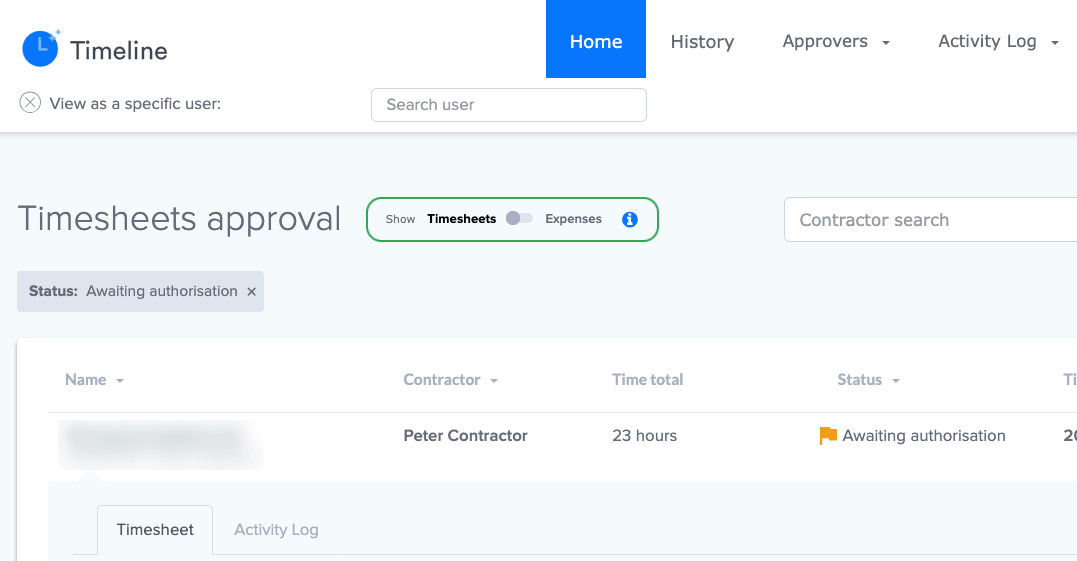
Swipe across for the status. Timesheet approval: hours waiting for sign-off, before they become pay. A name is hidden. Workers submit their hours online, managers approve them, and approved hours become the payslip and the client invoice.
- Paid
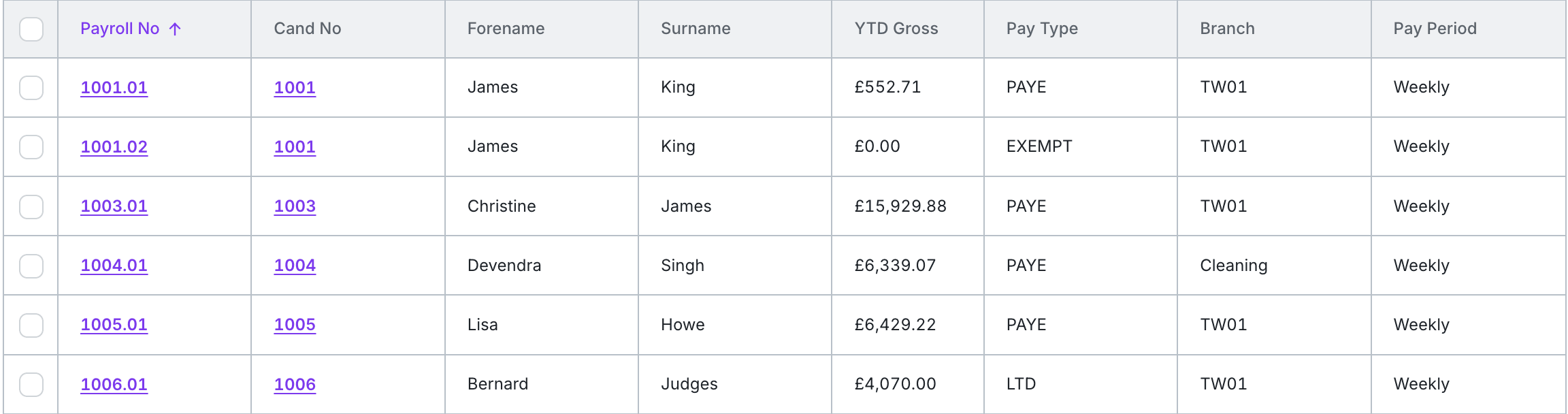
Swipe across for the names and pay. Pay & Bill: payroll records for PAYE and limited company workers, paid weekly. Demo data.
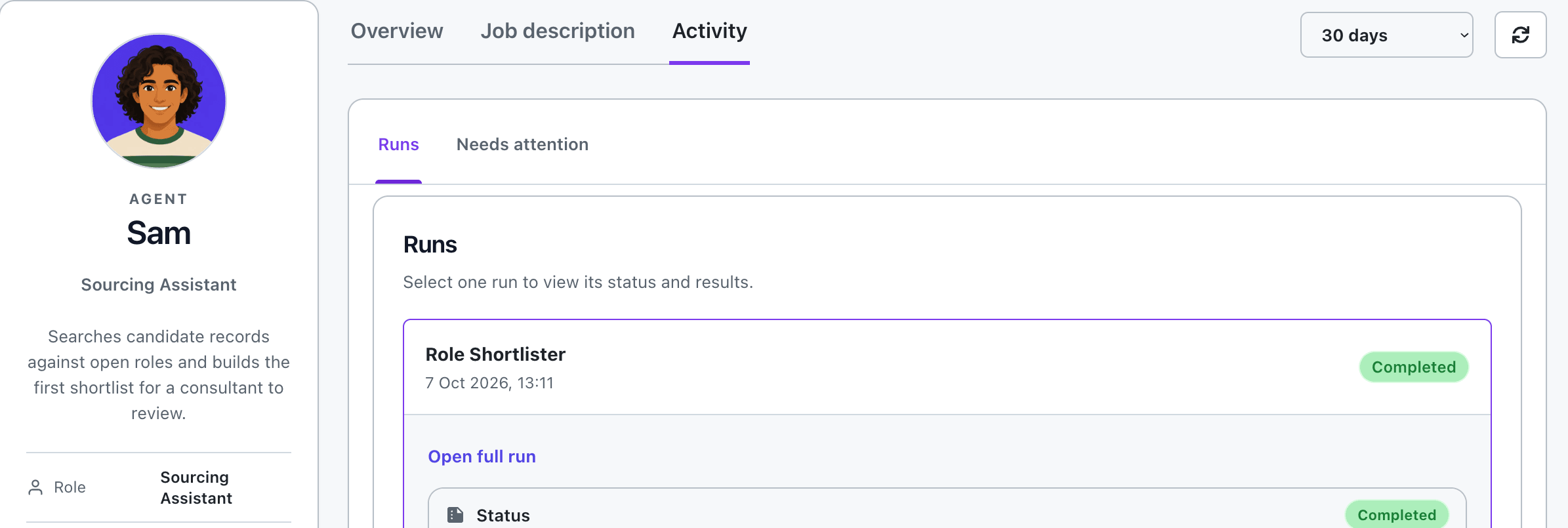
Each run is recorded on the agent's screen.
Sourcing Sam's screen shows his brief and each run with its status. This Role Shortlister run completed on 7 October.
"The payroll & charge system meets all our needs which is impressive considering our size and complexity."
Morson, Recruitment Agency of the Year (100+ employees) at the 2025 Recruiter Awards, runs its desks on Talisman.
Your way of working. Written into the agent.
Describe the task as you would to a new starter. Your team reviews the early results and feeds back corrections. Once your team is confident, the agreed work runs on its own.
- 01
We build around your brief
Tell us what arrives, which records the agent needs and what a good result looks like. Agent set-up is part of implementation.
- 02
Train it with your team
Check the output and feed back corrections. Keep the sign-offs your agency needs.
- 03
Let the agreed work run
Inspect the recorded work. Stop a run when you need to. Your team handles the exceptions.
Illustration · training-period review
- ✓ Read the submitted photo
- ✓ Match the worker and booking
- ! Flag Wednesday's extra half hour
Check the extra half hour with the worker before this goes for approval.
Make the brief specific to your agency.
For an education agency, we built Clara's checklist with visa evidence and an enhanced DBS.
- Right to work
- Visa evidence
- Enhanced DBS
- Your team's approval
What happens during the training period?
Your team checks the results and feeds back corrections. This training period does not train the underlying model on your agency's records.
Founded in 1981. Building agents today.
 Booking
 Timesheet
 Pay
 Invoice
 Agents
Forty years of temp and contract know-how matters when a booking becomes a timesheet, then pay and an invoice. Perm agencies can start with their own work, including database matching and client outreach.
One customer's result
Bring the task you want off your desk.
In the demo you see the agent dashboard, then one agent doing one task on demo records. Bring one task of yours, on your system or ours: what comes in, what your team does now and what needs to be ready. That gives us the brief to build around.
The button opens four quick questions. One of our team then gets back to you within the hour in working hours, for a 20-minute call about your agency.
Book a task demoA task to bring to your demo
- What comes in
- Photos of weekly timesheets
- What your team does now
- Reads and types the hours
- What needs to be ready
- A timecard, with the image attached